Agentic Architectural Discovery with Evolutionary Coding Agents
A CHIA case study that sets up an agentic discovery flow using evolutionary coding agents
to discover novel hardware data prefetchers for ChampSim
— a widely-used microarchitectural simulator for memory system research.
The full flow lives in the evolve-flows
repository under examples/alphaevolve-champsim-simple.
Overview
Architects spend significant amounts of time and resources in designing microarchitectural blocks such as data prefetchers, cache replacement policies, and branch predictors to extract performance gains in a processor. Recently, ArchAgent [1] demonstrated the ability of evolutionary coding agents to automatically discover novel cache replacement policies for last-level caches in processors in a matter of days. These discovered policies were more performant and discovered much faster than prior human-designed state-of-the-art policies.
However, designing, debugging, and operating such flows comes with significant user burden. This case study demonstrates how CHIA addresses these challenges. It implements and deploys a complete ArchAgent-like evolutionary discovery flow for prefetcher discovery — from AlphaEvolve-driven candidate generation through parallel ChampSim evaluation — in a small amount of code by composing CHIA’s library nodes. The flow is designed to be a starting point: the same pattern scales to more sophisticated evaluation cascades (RTL simulation, FPGA emulation, physical design) using CHIA’s extensible node library.
A hardware data prefetcher is a microarchitectural block that predicts which cache lines a program will access next and fetches them before they are needed, hiding memory latency. Designing a good prefetcher is hard as prefetches must be accurate and timely while covering a substantial portion of the program’s memory accesses to derive meaningful gains. Different workloads exhibit different access patterns (stride, pointer-chasing, spatial, temporal), and a prefetcher that helps one workload may hurt another by polluting the cache with useless lines. IPC (instructions per cycle) is an end-to-end metric capturing a given application’s performance on a processor. The standard metric to evaluate prefetchers is geomean IPC across a suite of benchmarks where higher is better.
alphaevolve-champsim-simple automates prefetcher design as an evolutionary
discovery loop. In each iteration:
an evolutionary coding agent proposes a candidate C++ prefetcher module (a
structimplementing the ChampSim prefetcher API),the candidate is compiled into a ChampSim binary on a dedicated build worker,
the binary is run in parallel against a suite of benchmark traces — one run per trace, fanned out across a pool of simulation workers, and
a result mapper aggregates per-trace IPC into a single fitness score (geomean IPC) that feeds back to the evolutionary search.
Note
Goal
This case study showcases CHIA’s ability to compose evolutionary discovery
flows from reusable building blocks. The EvolverNode wraps various evolutionary coding agents;
the ChampSimNode handles build and simulation of candidates; the cluster
config manages worker lifecycle and resource scheduling. The same three-function
interface (build_fn, run_fn, result_mapper_fn) plugs into any CHIA
evaluator backend, so swapping the simulator — or the evolutionary agent — is
a small configuration and code edit, not a complete rewrite.
How it works
The evolutionary discovery loop
Each iteration of the flow generates a candidate C++ prefetcher, compiles it into a ChampSim simulator, runs it against a set of benchmark traces in parallel, and feeds the aggregated performance metrics back as a fitness score. The loop repeats until a stopping criterion is met (iteration limit, manual stop, or convergence).
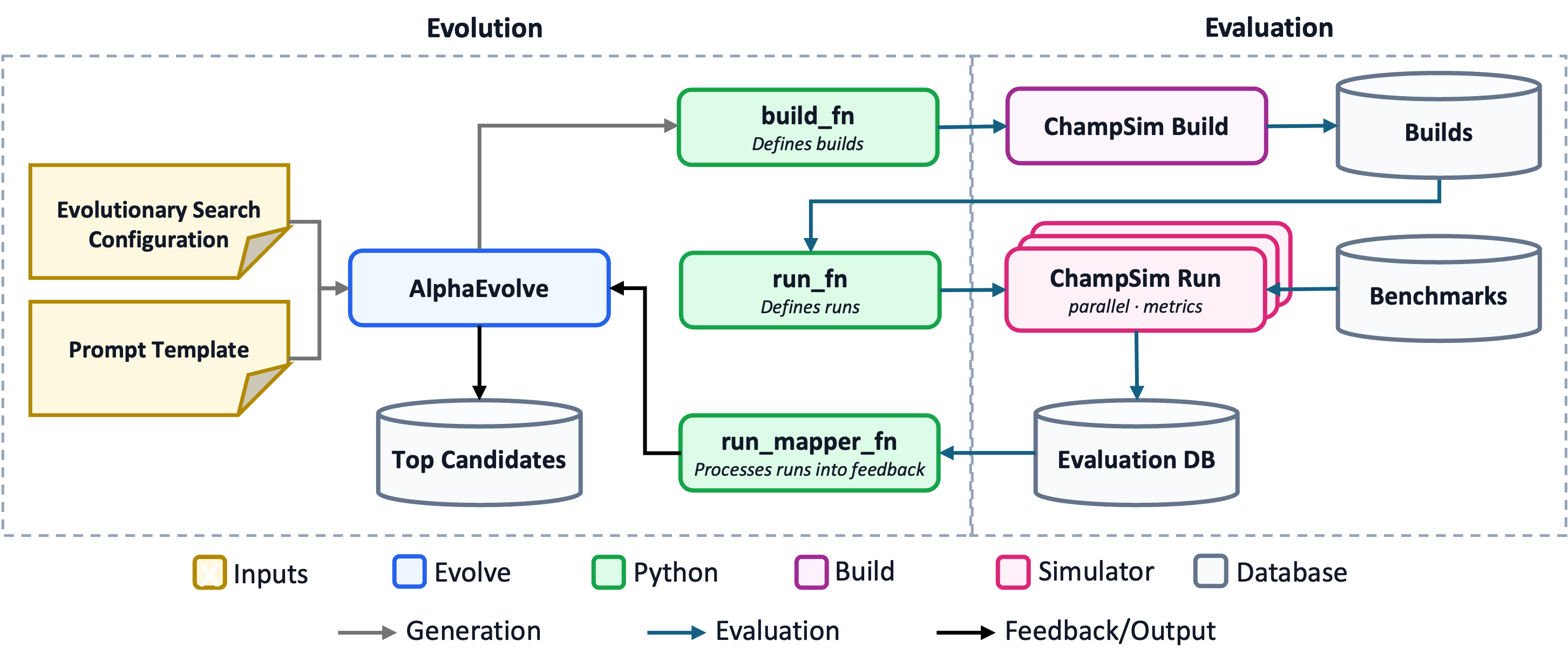
Architecture of the evolutionary prefetcher discovery loop. The evolution side generates candidates using an evolutionary coding agent such as AlphaEvolve and receives fitness feedback; the evaluation side compiles each candidate, runs it against benchmark traces in parallel, and aggregates metrics into fitness feedback.
Note
Simplified example
This example is a scaled down version of the flow described in ArchAgent: 3 SPEC CPU 2017 ChampSim traces, 5 simulation workers, and 10 search iterations — enough to demonstrate the architecture and see IPC improvements in under an hour.
The three-function evaluator interface
The heart of the CHIA integration is the ChiaEvaluator, which defines the
flow’s evaluation pipeline through three functions. This same interface is used
by all CHIA evolutionary discovery flows, regardless of the underlying
simulator:
build_fn — takes a candidate program (source code) and produces a compiled artifact. Here it dispatches a ChampSim build onto a
champsim_buildworker:def _build(self, program_solution: str) -> Any: return self._build_node.build_champsim.options( resources={"champsim_build": 1.0}, num_cpus=8, ).chia_remote( self._champsim_root, program_solution, self._module_name, cache_level=self._cache_level, timeout_s=1800, incremental=True, )
run_fn — takes the compiled binary and a workload, then runs the simulation. Each trace is dispatched to a separate
champsimworker, so traces run in parallel up to the cluster’s worker count:def _run(self, *, workload: str) -> Any: binary = _eval_binary.get() return self._run_node.run_champsim.chia_remote( binary=binary, trace=workload, warmup_instructions=self._warmup, simulation_instructions=self._sim_instr, timeout_s=3600, )
result_mapper_fn — transforms raw simulator output into the metrics dict the search backend consumes. For ChampSim this extracts IPC, MPKI, prefetch accuracy, and coverage, then computes a geometric mean IPC as the combined fitness score.
The ChiaEvaluator orchestrates these three functions: it calls build_fn
once per candidate, fans out run_fn across all configured workloads in
parallel via CHIA’s resource scheduler, collects the results, and calls
result_mapper_fn to produce the score. Build failures (invalid C++ is
expected from LLM-generated code) score 0.0 and the search continues —
the evaluator never crashes on a bad candidate.
EvolverNode: pluggable evolutionary agents
The EvolverNode wraps SkyDiscover
— a flexible framework for AI-driven scientific and algorithmic discovery with
support for evolutionary coding agents such as AdaEvolve, OpenEvolve, EvoX, and
GEPA. CHIA adds an AlphaEvolve
backend via the AlphaEvolve Google Cloud API. The search.type field in the
config YAML selects which agent drives candidate generation; the evaluation
pipeline stays the same regardless.
Distributing work across the cluster
The cluster uses three logical worker types, each tagged with a custom CHIA resource so the scheduler routes tasks to the right container:
Node type |
Workers |
Role |
|---|---|---|
|
1 |
compiles candidates into ChampSim binaries (Docker, 8 CPUs,
|
|
5 |
runs simulations against traces in parallel (Docker, |
|
1 |
hosts the |
The build worker is pinned to 8 CPUs (--cpuset-cpus=0-7) for fast
compilation. The five run workers execute traces concurrently — with three
traces per iteration, all three run in parallel with two workers spare for the
next iteration’s overlap.
Each ChampSimNode is created with require_colocated=False, meaning builds
and runs are dispatched to any available worker with the required resource,
not pinned to a specific container. CHIA’s resource scheduler handles the
assignment:
build_node = ChampSimNode(require_colocated=False)
run_node = ChampSimNode(require_colocated=False)
The EvolverNode itself is a detached Ray actor — it survives the
launching process, which enables the stop and status subcommands to
connect from a separate terminal and interact with a running search. This is a
standard Ray pattern that CHIA leverages for long-running search lifecycle
management:
evolver = EvolverNode.options(
    name="adaevolve-prefetcher-simple-evolver",
    lifetime="detached",
    resources={"evolver": 1.0},
    runtime_env=RUNTIME_ENV,
).remote()
The seed program
The search starts from a seed program — a minimal next-line prefetcher that prefetches the cache line immediately following each L2C access. This gives the search a non-zero baseline IPC to improve upon, and ensures the first iteration exercises the full build → run → map pipeline before the LLM generates any candidates:
#include <cstdint>
#include "address.h"
#include "modules.h"

struct evolved_pf : public champsim::modules::prefetcher {
  using prefetcher::prefetcher;

  uint32_t prefetcher_cache_operate(champsim::address addr, champsim::address ip,
                                     uint8_t cache_hit, bool useful_prefetch,
                                     access_type type, uint32_t metadata_in) {
    champsim::block_number pf_addr{addr};
    prefetch_line(champsim::address{pf_addr + 1}, true, metadata_in);
    return metadata_in;
  }

  uint32_t prefetcher_cache_fill(champsim::address addr, long set, long way,
                                  uint8_t prefetch, champsim::address evicted_addr,
                                  uint32_t metadata_in) {
    return metadata_in;
  }
};
The system prompt (shared by both search backends) describes the ChampSim prefetcher API, optimization objectives (IPC, prefetch accuracy, coverage, MPKI), and techniques to explore (stride detection, spatial locality, temporal correlation, best-offset, Markov chains, adaptive throttling). The LLM is constrained to pure C++17 with no external libraries.
Setup
These steps apply to both search backends. Run them from the example directory
(examples/alphaevolve-champsim-simple) unless noted.
1. Prerequisites — this flow requires:
A conda environment with
chiainstalledChampSim traces for your benchmarks of choice. We use 3 SPEC17 traces from the 4th Data Prefetching Championship (DPC-4) trace collection.
AlphaEvolve prerequisites:
a GCP project with AlphaEvolve enabled and a Gemini Enterprise license (trial available) — we suggest working through the Install and Configure AlphaEvolve page
a gcloud credentials file: run
gcloud auth application-default login
AdaEvolve prerequisites:
an LLM API key (Gemini, OpenAI, Anthropic, DeepSeek, Mistral, or Cohere)
2. Install evolve-flows — clone the evolve-flows repository and install it along with SkyDiscover into your conda environment:
git clone --recurse-submodules git@github.com:ucb-bar/evolve-flows.git
cd evolve-flows
conda activate your_env
pip install -e ./skydiscover
pip install -e .
3. Configure traces and output — in run_flow.py, update TRACE_DIR
to point at the directory containing your trace files, set the WORKLOADS
list to the traces you want to evaluate against, and optionally update
DEFAULT_OUTPUT_BASE to your desired output location:
TRACE_DIR = "/path/to/traces"
WORKLOADS = [
    os.path.join(TRACE_DIR, "trace_1.champsimtrace.xz"),
    os.path.join(TRACE_DIR, "trace_2.champsimtrace.xz"),
    os.path.join(TRACE_DIR, "trace_3.champsimtrace.xz"),
]
DEFAULT_OUTPUT_BASE = "./results"
We use a single-server cluster for this case study. For a multi-server cluster, we recommend using a networked file system or a CHIA database node for these directories for simplicity.
The simulation parameters (5M warmup + 25M simulation instructions per trace) are set in the same file and can be adjusted for longer or shorter runs.
4. Cluster config — in cluster.yaml, set provider.head_ip to your
head machine’s hostname or IP, and update compatible_ips for each node type
to list the machines those workers should run on. Update the auth section
with your SSH credentials:
provider:
    head_ip: your-head-machine

auth:
    ssh_user: your-username
    ssh_private_key: /path/to/your/ssh/key

available_node_types:
    champsim_build:
        compatible_ips: [your-head-machine]
        docker:
            image: "ghcr.io/ucb-bar/chia-champsim:latest"
            pull_before_run: true
            run_options:
                - -v /path/to/traces:/path/to/traces:ro
        # ...
    champsim:
        compatible_ips: [your-head-machine]
        docker:
            image: "ghcr.io/ucb-bar/chia-champsim:latest"
            pull_before_run: true
            run_options:
                - -v /path/to/traces:/path/to/traces:ro
        # ...
    evolver:
        compatible_ips: [your-head-machine]
        # ...
All three worker types can run on a single machine. The champsim_build and
champsim workers use the ghcr.io/ucb-bar/chia-champsim:latest Docker
image, which chia up pulls automatically (pull_before_run: true). Update
the -v run option to mount your trace directory into the containers. See
Cluster Configuration Reference for the full schema.
5. Bring up the cluster:
conda activate your_env
cd /path/to/evolve-flows
chia up examples/alphaevolve-champsim-simple/cluster.yaml
Verify at the Ray dashboard (http://<head>:8265) — you should see 7 workers
with resources champsim_build: 1, champsim: 5, evolver: 1.
Running with AlphaEvolve (primary path)
AlphaEvolve uses Google’s cloud API for candidate generation. Ensure you have completed the AlphaEvolve prerequisites from Step 1:
A GCP project with AlphaEvolve enabled and a Gemini Enterprise license (trial available) — work through the Install and Configure AlphaEvolve page
Application default credentials: run
gcloud auth application-default login
6a. Set up AlphaEvolve config — in config_alphaevolve.yaml, update the
alphaevolve: section to match your GCP project:
alphaevolve:
  project_id: "YOUR_GCP_PROJECT"
  engine_id: "alpha-evolve-experiment-engine"
  credentials_file: "application_default_credentials.json"
7a. Launch the search:
cd examples/alphaevolve-champsim-simple
python run_flow.py --config config_alphaevolve.yaml
config_alphaevolve.yaml sets search.type: "alphaevolve" and configures evolutionary search parameters.
Running with AdaEvolve (alternative path)
AdaEvolve runs entirely locally — no GCP project or external credentials beyond an LLM API key are needed. This makes it a good starting point, and demonstrates CHIA’s ability to swap search backends with a config change.
6b. Set the LLM API key — SkyDiscover’s included backends (AdaEvolve, EvoX,
etc.) use an OpenAI-compatible interface and support multiple LLM providers.
The default config uses Gemini, but you can switch by changing the model names
in config_adaevolve.yaml and exporting the corresponding API key:
Provider |
Model name prefix |
Environment variable |
|---|---|---|
Gemini |
|
|
OpenAI |
|
|
Anthropic |
|
|
DeepSeek |
|
|
Mistral |
|
|
Cohere |
|
|
For example, to use Gemini (the default):
export GEMINI_API_KEY="your-api-key"
7b. Launch the search:
cd examples/alphaevolve-champsim-simple
python run_flow.py --config config_adaevolve.yaml
config_adaevolve.yaml sets search.type: "adaevolve" and configures the
LLM models, population parameters, and search hyperparameters. The evaluation
pipeline is identical — only the candidate generation differs.
Monitoring and stopping
Because the EvolverNode is a detached Ray actor, you can query and control
a running search from a separate terminal:
# In a separate terminal (same conda env, same directory):
python run_flow.py status    # prints state, iteration, best_score
python run_flow.py stop      # graceful stop after current iteration
The launching terminal polls the actor every 30 seconds and incrementally saves
the best program to best_prefetcher.cc in the output directory whenever the
score improves.
Tear down — when the run is done:
cd /path/to/evolve-flows
chia down examples/alphaevolve-champsim-simple/cluster.yaml
Outputs
The output directory (printed at launch) contains:
best_prefetcher.cc— the best evolved C++ prefetcher sourcechia_eval_log.jsonl— per-evaluation build/run details (one JSON line per candidate, including per-trace IPC, MPKI, prefetch accuracy, and coverage)
What success looks like
Cluster comes up with all 7 workers
First iteration completes (seed program builds, runs on all traces, returns a non-zero baseline IPC)
Subsequent iterations generate new candidates via the LLM — some fail to compile (expected; scored
0.0), others build and runbest_prefetcher.cccontains valid C++ prefetcher codechia_eval_log.jsonlhas entries withcombined_score > 0python run_flow.py statusandpython run_flow.py stopwork from separate terminals
Troubleshooting
Ray connection refused: check
ray statuson the head machine, or re-runchia upBuild failures: check
chia_eval_log.jsonlforfailure_stage: buildentries — LLM-generated C++ can sometimes fail to compile, which is expected (build failures score0.0and the search continues)Auth errors (AlphaEvolve): ensure you have run
gcloud auth application-default loginand thatGOOGLE_APPLICATION_CREDENTIALSpoints to a valid credentials file (see prerequisites)Early termination (AlphaEvolve): the AlphaEvolve controller has an
idle_timeout_sthat stops the search if no new candidates are generated or evaluated and the evaluation queue is empty for that duration. If your evaluations take a long time (e.g. 20+ minutes per candidate), the timeout can fire between batches — after evaluations drain and before the remote API produces the next candidate. Increaseidle_timeout_sin thealphaevolve:config section to at least the worst-case gap (we default to 1800s). Set to0to disable entirely, but note that the controller will then never self-terminate if the backend goes quiet.API key errors (AdaEvolve): ensure the API key for your configured provider is exported (e.g.
GEMINI_API_KEY,OPENAI_API_KEY) in the shell that runspython run_flow.py— it must match theapi_keyfield inconfig_adaevolve.yaml